

Featured in this article
is an essential fixture in every home. Benefits extend to everything from streaming movies and online gaming to video calls. Most people can get by just fine with a single Wi-Fi router, and I’ve collected recommendations to suit different needs, spaces, and budgets. I have tested all of these in my busy family home, which is full of Netflix-addicted gamers.
After testing more than 50 routers (some have since been discontinued or removed, but many are reviewed on this page), the Asus RT-BE58U is the best Wi-Fi router for most people, especially thanks to its affordable price. I have plenty of alternatives to suit different households and budgets though, including a mesh Wi-Fi option if dead zones plague you.
Make sure to check out our Best Mesh Wi-Fi Routers guide for larger homes. If you’re confused about terminology, my How to Buy a Router guide can help, along with my explainer on mesh systems versus single routers.
Note: The FCC’s foreign-made router ban announced in March may stop any company that doesn’t secure an exemption (Conditional Approval) from selling new routers in the US, however, existing routers can continue to be sold (everything listed here). They can also be updated with new firmware, at least until January 1, 2029. So far, Netgear and Eero are the only consumer router manufacturers to have secured a Conditional Approval.
Updated August 2026: I changed my top picks and added the Asus RT-BE58U as the best router for most people, the Netgear Nighthawk RS300 as the best midrange router, the TP-Link Archer BE230 as the best budget router, removed some older routers, added a section on Wi-Fi 6E and Wi-Fi 6 with a couple of recommendations, and updated prices.
-
Best Router for Most People
Photograph: Simon HillRT-BE58U
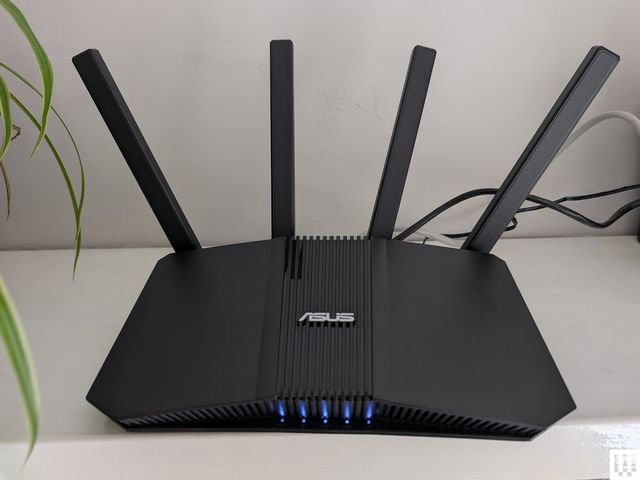
I’m recommending the Asus RT-BE58U as the best Wi-Fi router for most people. It was quick and easy to set up and covered my previous modern, two-floor, 1,600-square-foot home with fast and reliable connectivity, keeping pace with many more expensive systems in my tests. This is a dual-band router, so you miss out on the 6-GHz band, which allows for the fastest speed and highest bandwidth but has a very short range. However, you get the other benefits of Wi-Fi 7 (MLO, 4K-QAM, 160 MHz channels, and enhanced security, all of which are explained in my guide). It has a generous 2.5-Gbps WAN/LAN, 1-Gbps WAN/LAN, three further gigabit LANs, and a USB WAN capable of 4G LTE and 5G Mobile tethering. Asus also includes network security (Trend Micro’s AiProtection Pro) and solid parental controls at no extra cost (most manufacturers have a subscription model). But AiProtection means sharing your data with Trend Micro, so I recommend reviewing its privacy policy.
This home router was rock solid for our busy family of four, flawlessly coping with multiple streams and gaming sessions and making the most of our 1-Gbps connection. The only issue I encountered was with devices in the furthest back bedroom dropping onto the 2.4-GHz band from the faster 5-GHz band; I resolved this by adjusting the router position and antennas. (This is crucial to get the most from any router.)
The Asus mobile app is simple and easy to use, and you can dig deeperer manufacturers, and there’s support for VPN service, separate IoT or guest networks, and Ai Mesh, enabling you to add more Asus routers to create a mesh. The Asus RT-BE58U makes a lot of sense for average-size families with up to 1-Gbps internet connections and homes up to 2,000 square feet
Specs Version: Wi-Fi 7 Bands: 5 GHz and 2.4 GHz Ports: 1x 2.5 Gbps WAN, 1x Gigabit WAN/LAN, 3x Gigabit LAN, 1x USB WAN Size: 9.37 x 7.6 x 2.32 inches, 1.01 pounds WIRED/TIRED
WIRED- Excellent dual-band performance
- Affordable Wi-Fi 7
- Subscription-free security and parental controls
TIRED
- No 6-GHz band
-
Best Router Upgrade Pick
Photograph: Simon HillRT-BE96U
$630
$530(16% off)
$530
$530
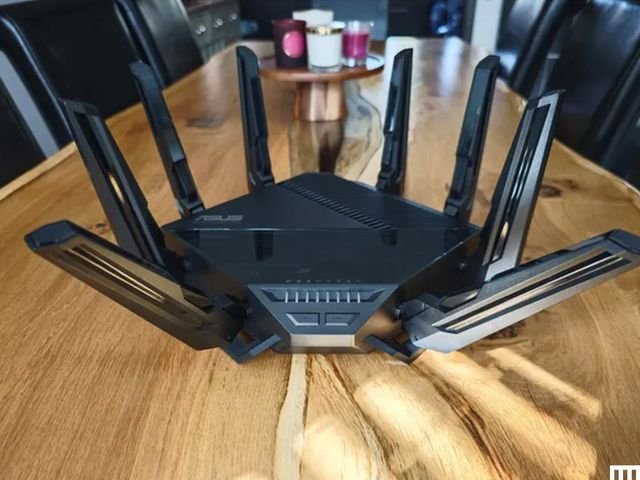
$630If your budget isn’t fixed and you want top speeds, then the Asus RT-BE96U is calling. This enormous, tri-band, Wi-Fi 7 router is bristling with eight large antennas and is not easy to mount, so you will need a suitable space for it. It’s seriously massive, but performance-wise, this is as good as it gets right now. Testing on the 2.4-GHz, 5-GHz, and 6-GHz bands, only one other router has performed better, and it was the GT-BE98 Pro gaming router, also from Asus (I have a separate guide coming soon). The RT-BE96U offers expansive coverage, easily blanketing my home and garden with stable, speedy Wi-Fi. Whether downloading or moving large files, gaming, or streaming, the RT-BE96U is fast and reliable. It also has two 10-Gbps ports (one WAN/LAN and a LAN), four gigabit LANs, one USB 3.2, and a USB 2.0 port. Being super picky, it might have been nice if those gigabit ports were 2.5 Gbps, as TP-Link offers in the BE800.
I love that Asus continues to avoid the subscription model, offering AiProtection security, VPN functionality, and robust parental controls as part of the purchase price and free for the lifetime of the router. You also get an in-depth set of networking features you can dig into, and there is support for AiMesh, enabling you to link this with other Asus routers to create a mesh. You don’t even have to create an account to use this router (a rarity nowadays). The firmware on Asus routers can sometimes be ropey at release, but I used the RT-BE96U for a couple of weeks without a hiccup. The caveat? You need devices that support Wi-Fi 7 and a multi-gig connection to put this router through its paces. Most folks don’t have to spend this much to get great Wi-Fi, but if you want a router to last you the next five years and beyond, this is an excellent choice.
Specs Version: Wi-Fi 7 Bands: 6 GHz, 5 GHz, and 2.4 GHz Ports: 1x 10-Gbps WAN/LAN, 1x 10-Gbps LAN, 4x Gigabit LAN, 1x USB 3.2, 1x USB 2.0 Size: 13.8 x 13.8 x 8.57 inches, 4.1 pounds WIRED/TIRED
WIRED- Fast tri-band Wi-Fi 7 performance
- Subscription-free security and parental controls
- Feature rich
TIRED
- Large design
- Expensive
-
Best Budget Router
- Photograph: Simon Hill
- Photograph: Simon Hill
- Photograph: Simon Hill
Archer BE230
This is the lowest price I’ve seen for a Wi-Fi 7 router worth considering. The design sports four antennas, a 2.5-Gbps WAN, a 2.5-Gbps LAN, and three gigabit LAN ports. It is dual-band (2.4-GHz and 5-GHz), so there’s no 6-GHz option, and it’s only 2 x 2 MIMO, so the maximum bandwidth is 688 Mbps and 2,882 Mbps, respectively. When I first tested, I found the range on the 5-GHz band to be limited and the band steering disappointing, often dropping my phone onto the much slower 2.4-GHz band. But after further testing, I’ve reappraised. The BE230 did an impressive job of keeping my family of four online without obvious issues. Throughput is so-so, file transfers were mid-table in my results, and the BE230 finished below my top pick in every test, but it is significantly cheaper. It could be perfect for a small home or apartment, as it was impressively speedy at close range on both bands but dropped off with distance, making it tough to recommend for larger properties.
TP-Link’s Tether app is easy to use, and this model supports EasyMesh, so you can always add additional devices to create a mesh later. You can also review connected devices, split bands, create a guest network, prioritize devices, turn on MLO, and do a few other things in the app. You can add intrusion detection and real-time web security by subscribing to Security+ for $5 a month or $36 a year. Total Security adds antivirus, VPN, and password management for $6 a month or $70 a year. You get basic parental controls, but if you want time limits for apps, downtime, SafeSearch, and more, it will cost you $3 a month or $18 a year. The subscriptions are also a hard sell on a router this cheap, but you don’t need them.
Note: Even before the recent US foreign-made router ban, the US government was mulling a TP-Link router ban because of reports that vulnerabilities in the Chinese firm’s routers were exploited in high-profile attacks linked to the Chinese government. According to The Wall Street Journal, the US Commerce, Defense, and Justice departments are investigating TP-Link, though no evidence of any deliberate wrongdoing has yet emerged. TP-Link president Jeff Barney told WIRED the company is cooperating with the investigation, has a transparent supply chain with manufacturing in Vietnam, not China, and is now headquartered in California, having split from TP-Link Technologies, which focuses on mainland China. Texas attorney general Ken Paxton sued TP-Link in February, claiming the company allows the Chinese Communist Party to access American consumers’ devices. The impending ban will impact TP-Link, and it will have to apply for a Conditional Approval.
Specs Version: Wi-Fi 7 Bands: 5 GHz and 2.4 GHz Ports: 1x 2.5 Gbps WAN, 1x 2.5 Gbps LAN, 3x Gigabit LAN, 1x USB 3.0 Size: 910.7 x 5.8 x 1.6 inches, 1.21 pounds WIRED/TIRED
WIRED- Solid dual-band performance
- Affordable Wi-Fi 7
- Generous ports
TIRED
- No 6-GHz band
-
Best Midrange Router
Photograph: Simon HillNighthawk RS300
$300
$300
$272(9% off)
$300
$280(7% off)
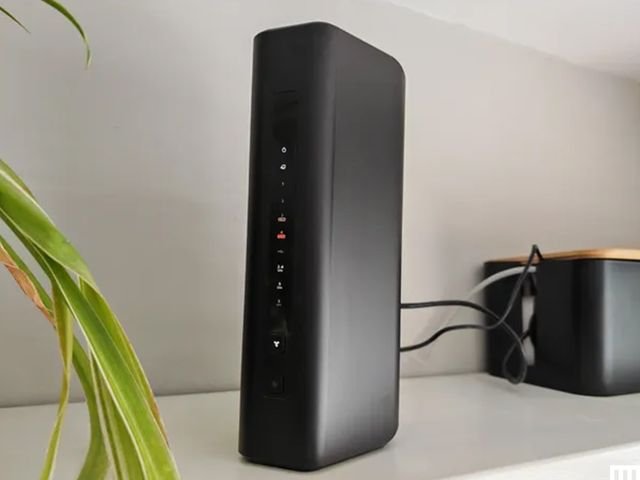
$300It’s still not cheap, but at around half the price of my upgrade pick, this Netgear router is a solid option that will likely exceed most folks’ needs. The classy tower design is understated, and this is a fanless router that kept its cool during my tests. Setup was a breeze, and the simplified app is designed to be hands-off. The Nighthawk RS300 offers 2.4-GHz, 5-GHz, and 6-GHz bands. Speed and stability on the 5-GHz and 6-GHz bands were excellent, though the range on the 6-GHz band is limited. Performance on the 2.4-GHz band was slightly below par, but that will likely only be an issue if you have loads of older devices. The RS300 has one 2.5 Gbps Ethernet port for your incoming internet, two 2.5 Gbps and two Gigabit LAN ports, and one USB 3.0 port.
While Asus routers are great for tinkerers who want to dive into settings, Netgear limits your options to keep things simple. You can still set up a guest network, run speed tests, split bands, meter your traffic, and analyze your Wi-Fi signal in the accessible Nighthawk app. Premium Smart Parental Controls ($8/month or $70/year) and Netgear Armor ($100/year) add tons of features, but they are expensive (you get a 30-day trial of each), and most people don’t need them. The RS300 is one of the best experiences I have had with a Netgear router, with very fast speeds on the 5- and 6-GHz bands, lightning-quick file transfer times, and no issues over two weeks of testing. For folks with mostly newish gadgets, internet connections up to 2.5 Gbps, and no desire to tweak network settings, this is a solid Wi-Fi 7 router.
Specs Version: Wi-Fi 7 Bands: 6 GHz, 5 GHz, and 2.4 GHz Ports: 1x 2.5 Gbps WAN/LAN, 2x 2.5-Gbps LAN, 2x Gigabit LAN, 1x USB 3.0 Size: 9.8 x 5.9 x 4 inches, 2.09 pounds WIRED/TIRED
WIRED- Excellent tri-band Wi-Fi 7 performance
- Three 2.5 Gbps ports
- Fanless design
TIRED
- Subscription required for security and parental controls
- Not mesh expandable
-
Best Mesh Router for Large Homes
- Photograph: Simon Hill
- Photograph: Simon Hill
- Photograph: Simon Hill
Orbi 770 Series
$550
$700
$550
$480(13% off)
$550Consistently delivering a stable, high-speed Wi-Fi connection, the Netgear Orbi 770 Series mesh system is our pick of the Best Mesh Wi-Fi Routers and is ideal for large homes or houses with dead spots. The relatively large tower design enables expansive coverage. (Netgear optimistically suggests up to 8,000 square feet for a three-pack.) The main router has four 2.5-Gbps Ethernet ports, while the satellites make do with two 2.5-Gbps ports apiece. Setup is quick and easy, and the Orbi app is straightforward. This tri-band system supports 2.4-GHz, 5-GHz, and 6-GHz bands, and multi-link operation (MLO), allowing devices to connect on multiple bands simultaneously.
On the downside, there’s no USB. You get 30-day trials of Netgear’s Armor security software (powered by Bitdefender) and Smart Parental Controls, but then subscriptions are required if you want to keep using those software features. Armor (phishing and malware protection, device and network scanning) costs $40 for the first year, jumping to $100 thereafter, and the parental controls (profiles, age-appropriate filters, scheduling, and time limits) are $8 per month. You need a large home, a multi-gig internet connection (up to 2.5 Gbps), and at least a couple of Wi-Fi 7 devices to take full advantage of this mesh, but it’s a reliable performer that will serve you well for years to come.
Specs Version: Wi-Fi 7 Bands: 6 GHz, 5 GHz, and 2.4 GHz Ports: One 2.5 Gbps WAN, three 2.5 Gbps LAN (main), two 2.5 Gbps LAN (satellites) Size: 5.28 x 9.88 x 3.95 inches WIRED/TIRED
WIRED- Easy setup
- Speedy and stable Wi-Fi 7
- Expansive coverage
TIRED
- Security and smart parental controls require a subscription
- No USB port
-
Best Travel Router
- Photograph: Simon Hill
- Photograph: Simon Hill
- Photograph: Simon Hill
RT-BE58 Go
$160
$118(26% off)
$160
$130(19% off)Whether you’re away from home for work or on vacation, a travel router could come in very handy, and the dual-band, Wi-Fi 7 Asus RT-BE58 Go is faster and offers greater range than the TP-Link Roam 7 (BE3600) it replaces here, though it is a bit bigger. Connect your devices at home, and a travel router provides convenience on vacation. I took it on a recent trip, and it was nice to simply hook it up to a source to have pre-paired Wi-Fi on everyone’s devices without being asked for the login again and again (as usually happens). You can plug in an internet source via Ethernet, connect to public Wi-Fi, or employ USB tethering. It’s especially handy when you want to connect multiple devices to hotel Wi-Fi, which limits your device connections.
Despite its small size, it does a decent job delivering reasonably speedy connectivity, especially at close range. There are two fold-out antennas, and it will easily fill a hotel room or vacation apartment. Although there’s no built-in battery, the USB-C power port on the back works just fine with a power bank for complete portability. There is VPN support, it can serve as an AiMesh node if you have an Asus mesh, and you can plug in storage
Specs Version: Wi-Fi 7 Bands: 5 GHz and 2.4 GHz Ports: 1x 2.5 Gbps WAN, 1x Gigabit LAN, 1x USB-A 3.0 Size: 4.4 x 3.9 x 1.4 inches, 8 ounces WIRED/TIRED
WIRED- Very portable
- Versatile functionality
- Works with a power bank
TIRED
- Limited range and performance
- No SIM slot
- No battery
-
Best 5G Router (Mobile Hot Spot)
- Photograph: Simon Hill
- Photograph: Simon Hill
- Photograph: Simon Hill
- Photograph: Simon Hill
Nighthawk M7
After testing several 5G routers and mobile hot spots, I recommend the Netgear Nighthawk M7. Pop in a 5G SIM (it works with AT&T, T-Mobile, and Verizon) or sign up for an eSIM (Netgear offers plan for 140 countries), and you have a dual-band Wi-Fi 7 router to use on the go. It has a smart design, a handy 2.4-inch color screen, and a battery that’s good for up to 10 hours of use (I got 9 hours before having to charge). I combined it with a power bank to last even longer. You can connect up to 32 devices via Wi-Fi and expect a range of up to 2,000 square feet. Many other 5G routers I tested became unstable and warm with multiple devices connected, but the M7 handled it just fine.
Previous Netgear hot spots, while excellent, have been very expensive, so I’m happy to trade in some ports and a touchscreen to get a more affordable device. It only has a USB-C port, but it’s capable of 2.5 Gbps speeds if you snag Netgear’s USB-C to Ethernet Adapter ($32) and plug in a device with an Ethernet cable. While it covers several popular 5G bands, there’s no mmWave support, but it also covers a good range of LTE bands. I love that you can set it to fall back onto Wi-Fi when available, such as when you return to the hotel at the end of the day.
Specs Version: Wi-Fi 7 Bands: 5 GHz, and 2.4 GHz Ports: 1x USB-C port, SIM slot Size: 5.71 x 3.29 x 0.67 inches, 8.5 ounces WIRED/TIRED
WIRED- Speedy dual-band Wi-Fi 7 performance
- Versatile functionality
- Works with most carriers globally
TIRED
- Only has a USB-C port
- Requires a data plan
Compare 7 Top Wi-Fi Routers
| Product | Price (MSRP) | Wi-Fi Version | Bands | Ports | Suggested Coverage |
|---|---|---|---|---|---|
| Best Router:Asus RT-BE58U | $150 | Wi-Fi 7 | 5 GHz, and 2.4 GHz | 1x 2.5 Gbps WAN, 1x Gigabit WAN/LAN, 3x Gigabit LAN, 1x USB WAN | 2,000 square feet |
| Upgrade Pick:Asus RT-BE96U | $550 | Wi-Fi 7 | 6 GHz, 5 GHz, and 2.4 GHz | 1x 10-Gbps WAN/LAN, 1x 10-Gbps LAN, 4x Gigabit LAN, 1x USB 3.2, 1x USB 2.0 | 5,400 square feet |
| Best Midrange Router:Netgear Nighthawk RS300 | $300 | Wi-Fi 7 | 6 GHz, 5 GHz, and 2.4 GHz | 1x 2.5 Gbps WAN/LAN, 2x 2.5-Gbps LAN, 2x Gigabit LAN, 1x USB 3.0 | 2,000 square feet |
| Best Budget Router:TP-Link Archer BE230 | $120 | Wi-Fi 7 | 5 GHz, and 2.4 GHz | 1x 2.5 Gbps WAN, 1x 2.5 Gbps LAN, 3x Gigabit LAN, 1x USB 3.0 | 2,000 square feet |
| Best Router for Large Homes:Netgear Orbi 770 Series (2-Pack) | $550 | Wi-Fi 7 | 6 GHz, 5 GHz and 2.4 GHz | 1x 2.5 Gbps WAN, 3x 2.5 Gbps LAN (main), 2x 2.5 Gbps LAN (satellites) | 5,500 square feet |
| Best Travel Router:Asus RT-BE58 Go | $160 | Wi-Fi 7 | 5 GHz and 2.4 GHz | 1x 2.5 Gbps WAN, 1x Gigabit LAN, 1x USB-A 3.0 | 1,800 square feet |
| Best 5G Router:Netgear Nighthawk M7 | $500 | Wi-Fi 7 | 5 GHz and 2.4 GHz | 1x USB-C, SIM slot | 2,000 square feet |

CHART: Simon Hill
Other Routers I Tested and Liked
I have tested many other models and have several more in the queue. These aren’t as great as the picks above, but they are worth considering.

Photograph: Simon Hill
TP-Link Archer BE600 for $250: This standalone router supports Wi-Fi 7. I don’t love the design, but the six adjustable antennas allow for tinkering, and TP-Link has been very generous with the ports (one 10 Gbps, four 2.5 Gbps, and a USB 3.0), though it’s a little annoying that the USB is on the side. This model also offers excellent close-range speeds on the 6-GHz band, and solid speeds on both the 5-GHz and 2.4-GHz bands, though TP-Link’s dual-band BE260 slightly outperformed it on those two bands. But it does offer a pretty expansive range (up to 2,600 square feet).

Photograph: Simon Hill
TP-Link Roam 7 (BE3600) for $130: This dual-band, Wi-Fi 7 travel router was my pick, but the Asus RT-BE58 Go above is a slightly better performer for around the same money. This is still a good, portable device, capable of keeping you online in your hotel room or modest apartment. It also supports mobile tethering, VPN, and can serve as a Wi-Fi range extender. There’s a USB-C for power that works with portable chargers, and a USB-A for file sharing or backup.
TP-Link Archer BE260 for $110: This dual-band (2.4 GHz and 5 GHz) Wi-Fi 7 router runs close to our top pick on performance and is a solid alternative. This router offers a slight upgrade over the BE230 above, with improved 5-GHz performance, an extra antenna, and a coverage boost up to 2,400 square feet. It also sports a 2.5-Gbps WAN, a 2.5-Gbps LAN, three Gigabit LAN, and a USB 3.0 port. Throw in EasyMesh support and a relatively low price, and the BE260 is a tempting option. But if you want enhanced security and parental controls, you have to subscribe, which takes the shine off the value.
Asus RT-BE86U for $207: The new Wi-Fi 7 version of the Asus RT-AX86U, this dual-band (2.4- and 5-GHz) router is similar to the Asus RT-BE88U below. It lacks the 6-GHz band but brings all the other improvements that Wi-Fi 7 offers. The RT-BE86U proved reliable in my tests and performed extremely well on the 5-GHz band, matching the slightly more expensive RT-BE88U. It is slightly smaller but still has one 10-Gbps and four 2.5-Gbps Ethernet ports, alongside a USB 2.0 and a USB 3.0 port.

Photograph: Simon Hill
AVM FRITZ!Box 5690 Pro for £500: AVM has dominated the German router market for years and is expanding across Europe and the UK, so I tested the FRITZ!Box 5690 Pro. AVM’s range is distinctive in white and red plastic, but there’s a focus on functionality. This tri-band Wi-Fi 7 router boasts a 2.5-Gbps WAN/LAN, four gigabit LAN, and a USB 3.1 port. It’s fast, scoring mid- to high-table results in my tests, and it proved reliable. It also has DSL or fiber-optic modems, an integrated DECT base station for cordless phones, built-in storage (NAS), and support for Zigbee to connect smart home devices. You don’t need an account to set it up or configure it. There’s a firewall and guest network option in the straightforward web interface (you can use the mobile app if you prefer). AVM’s routers are developed and manufactured in Europe, making them an interesting, privacy-focused alternative to routers from China or the US. The company also has a strong track record of supporting its products for years after release. Folks in the UK and Europe looking to upgrade to Wi-Fi 7 should consider this router. My fingers are crossed that AVM expands into the US next.
Asus RT-BE92U for $290: After a simple setup and a trouble-free week of speedy, stable internet across the 2.4-, 5-, and 6-GHz bands, I can recommend this router. It has Wi-Fi 7 benefits like MLO and 320-MHz channels, support for a guest network, VPN services, free security software, and parental controls. It also boasts a 10-Gbps WAN/LAN, a 2.5-Gbps WAN/LAN, three 2.5-Gbps LANs, and a USB 3.2 port. This tri-band Wi-Fi 7 device came perilously close to claiming the midrange spot above, but was a smidge slower on the 5-GHz and 6-GHz bands and had a considerably shorter range. However, if your home is around 1,500 square feet and you’d rather avoid a subscription, the RT-BE92U is an excellent alternative. Customer reviews suggest some folks have had trouble with this router, but the latest firmware was rock solid for me.
Asus RT-BE88U for $335: This dual-band Wi-Fi 7 router is an odd prospect because it does not offer the 6-GHz band at all, just 2.4 GHz and 5 GHz. But you can still combine those bands with MLO and enjoy features like 4K QAM, and this router will be fast enough for the average home. It has ports galore (two 10 Gbps, four 2.5 Gbps, four Gigabit, and one USB 3.0). It outperformed several more expensive routers on the 5-GHz band, and that’s likely what most of your devices are using most of the time right now. Asus also offers free security software and parental controls with its routers, so there’s no need for subscriptions. But when I consider that you can snag the Netgear Nighthawk RS300 listed above for less, I find it tough to recommend this router to folks in the US. If the 6-GHz band is unavailable or nerfed in your country, the RT-BE88U is for you.

Photograph: Simon Hill
Netgear Nighthawk RS700 for $600: Although I had setup issues that required a factory reset, there’s no hiding the top-notch performance of this router. It’s a Wi-Fi 7 tri-band router with two 10-Gbps Ethernet ports, four gigabit ports, and a USB 3.2. The tower design is new for the Nighthawk line, and it looks great. This router will blend in far better than our bulky Wi-Fi 7 pick above from Asus, and it was slightly faster on the 6-GHz band, though not the 5-GHz or 2.4-GHz bands. It mainly misses out on a recommendation because it is more expensive. We’re already seeing discounts on the RT-BE96U, and Asus offers free security software and parental controls. If you get the Nighthawk RS700S, the “S” at the end denotes a free year of Netgear Armor, which costs $100 a year thereafter. If you need parental controls, that’s another $70 a year.
TP-Link Archer BE800 for $500: With a fresh design that’s more desktop PC than router, the BE800 tri-band beast came out high up in my tests on the 2.4-GHz, 5-GHz, and 6-GHz bands, proving impressively swift for file transfers and downloads. It also boasts speedy ports galore, a cool but kind of pointless customizable dot-matrix LED screen, and the Tether app offers a guest network, IoT network, VPN server or client, EasyMesh, QoS for device prioritization, and remote management.
Netgear M3 for £450: I was very impressed by this mobile 5G router. Slip a SIM in there, and it connects to 4G or 5G networks to deliver Wi-Fi to your devices. It’s a dual-band Wi-Fi 6 model that’s speedy on the 5-GHz band. The M3 had no trouble handling multiple connected devices (up to 32) and served a stable internet connection for around 10 hours. You can charge via the USB-C port, and there’s a 2.4-inch LCD color screen for configuration. It’s a solid hot spot for business or personal travel. Sadly, the M3 doesn’t seem to be available in the US, but folks in the UK can save some money and snag this instead of the M7 above (it’s frequently discounted).
Firewalla Gold SE for $519: This quirky portable device is perfect for people who worry about security and privacy. It offers comprehensive tools for monitoring all traffic in and out of your house, robust and detailed parental controls, ad-blocking, and enhanced security with a built-in firewall and VPN option. It serves as a router, but you will want to pair another router in access point mode for Wi-Fi in your home. It’s expensive and may prove intimidating for inexperienced folks, but it offers deep insight into your network and an impressive depth of security features without an additional subscription. The Gold SE has two 2.5-Gbps ports and two gigabit ports and is suitable for folks with up to 2-gigabit connections. If your internet is only one gigabit, try the more affordable but slightly less capableFirewalla Purple ($409).
What About Wi-Fi 6E and Wi-Fi 6 Routers?
While I recommend buying a Wi-Fi 7 router if you’re upgrading, there are loads of Wi-Fi 6E and Wi-Fi 6 routers that will serve the average family well. With Wi-Fi 6E you still get the faster 6-GHz band. The bulk of household traffic still likely uses 5 GHz, and you can save a lot of money by sticking with Wi-Fi 6 for a bit longer.
Netgear Nighthawk RAXE300 for $369: The curvy spaceship design in matte black is a little more stealthy than your average gaming gear, but those wings contain antennas for a strong signal throughout your home. The Nighthawk RAXE300 is a tri-band router with Wi-Fi 6E support, covering the 2.4-GHz, 5-GHz, and 6-GHz bands. It served seamless, speedy Wi-Fi during two weeks of testing, with zero issues while handling a revolving mix of four simultaneous gaming and video streams. A single 2.5-Gbps WAN/LAN port, five gigabit LAN ports, and a USB-C 3.0 port will be enough for most folks.
The Nighthawk app is excellent and offers band splitting, guest network options, and a host of analytical tools. The Premium Smart Parental Controls ($8/month or $70/year) and Netgear Armor ($100/year) are slick, but the extra expense is hard to swallow when many competitors offer cheaper or free alternatives with similar features. This is discontinued, but a few places still have stock, and it’s still a great router.
TP-Link Archer AX55 for $90: This affordable Wi-Fi 6 router is still a decent pick for the average home. The slick black finish is attractive, and there are four antennas to direct Wi-Fi to every corner (it is worth tweaking and testing different positions). Performance was solid throughout my two-floor, 1,600-square-foot home but dropped off slightly in the back garden. Stability was excellent over a couple of weeks of testing, and this router ticks many feature boxes (MU-MIMO, beamforming, WPA3). It has four Gigabit Ethernet LAN ports, a single Gigabit WAN port, and a USB 3.0 port on the back, which is enough for most people.
I’m a fan of TP-Link’s Tether app, where you can review traffic, split bands, create a guest network, schedule reboots, set automatic updates, and even tell the LED to turn off at night. TP-Link’s basic free HomeShield tier offers network scanning, QoS (Quality of Service) for device prioritization, and basic parental controls so you can filter and blacklist websites and set the same bedtime every day. If you want a variable schedule, time limits, downtime, and real-time security protection, you must upgrade to HomeShield Pro (30-day free trial, then $6 per month or $55 for the year). If money is tight, you may even consider the next system down, the TP-Link Archer AX21 ($70). Performance is slightly weaker, but the experience is broadly similar.
Routers I Don’t Recommend
These are the internet routers we had issues with or can’t recommend for one reason or another.

Photograph: Simon Hill
Acer Connect X6E 5G: This is an interesting Wi-Fi 6E model with a 5G SIM card slot capable of keeping you online using a mobile network should your main broadband connection fail. It has two Gigabit Ethernet ports, a WAN/LAN, LAN, and an RJ-11 port for a phone line. It’s easy to set up and offers an NFC connection option, so you can just wave your phone over it to connect. This unusual blend of features could be good for business travelers. Performance was solid when it worked, and you can get a very fast connection at close range on both the 6-GHz and 5-GHz bands. Sadly, the range was limited, and the Connect X6E 5G was intermittently unstable during my testing, dropping devices randomly and cutting out repeatedly.

Photograph: Simon Hill
D-Link AX3000 DBR-330: This lightweight, rectangular travel router from D-Link is aimed at business professionals who travel for work. It’s a dual-band Wi-Fi 6 router that can also serve as a hot spot, with a connection via USB. There’s even a potentially handy microSD/TF card slot for up to 2 TB of storage for file sharing or backup. Setup via the browser is easy, and there’s built-in VPN support. It proved nice and fast at close range, but it dropped off quickly, and I couldn’t get a signal two rooms away. It will work fine for a hotel room, though. You can get our TP-Link travel router pick above or the Asus RT-AX57 Go for similar money, and I prefer both of them.
Netgear Nighthawk RS200: The RS200 is Netgear’s dual-band (2.4- and 5-GHz) router and the cheapest in its Wi-Fi 7 lineup. After the tri-band RS300 won a recommendation, I expected this router to perform decently, but I encountered several issues, including random drops and poor range. After turning the router off and on again, many devices, including my Pixel and iPhone, struggled to reconnect. Perhaps I have too many devices in my home for it, though Netgear suggests it can handle up to 80. It has two 2.5 Gbps ports, three gigabit Ethernet ports, and a USB 3.0 port. Test results were OK, but significantly slower than the RT-BE86U.
TP-Link Archer AX5400 Pro: This dual-band Wi-Fi 6 model is almost identical to the Archer AX73, except for the 2.5-Gbps WAN port. It delivers relatively fast speeds on the 2.4-GHz and 5-GHz bands and boasts a 160-MHz channel width on 5 GHz. The range is good, easily covering my home and garden, but the performance was inconsistent. It was also relatively slow at moving files locally. There’s support for TP-Link OneMesh, VPN, and QoS, but you only get basic parental controls and network security unless you subscribe.
What Features Should I Look for in a Router?
My How to Buy a Router guide answers a lot of questions on the terminology you’ll come across when shopping for a new router. Still, here are a few other considerations.
Wi-Fi Standards: All my main picks are now using the latest Wi-Fi 7 protocol. That doesn’t mean Wi-Fi 6 or Wi-Fi 6E routers aren’t worth having, necessarily. But with cheaper dual-band Wi-Fi 7 routers available, there’s not much reason to buy anything older. Only Wi-Fi 6E and Wi-Fi 7 routers offer extra bandwidth and faster speeds on the 6-GHz band, but devices like phones and laptops must also support Wi-Fi 6E or 7 for you to take advantage. The 6-GHz band is also short-range compared to the 2.4-GHz and 5-GHz bands.
Internet Speeds: Your maximum internet speed is set by your ISP and depends on your internet plan. It will likely fluctuate, depending on the time of day. Some ISPs guarantee a minimum download and upload speed. While your router can’t provide an internet connection that exceeds that speed, it can potentially go faster when you stream from a server in your home or move files from one device on your local network to another.
Coverage: It’s worth checking a prospective router’s coverage and speed, but understand that your home Wi-Fi mileage may vary. Construction materials in your house, your neighbors’ activity and Wi-Fi networks, your devices, and the position of your router are just a few of the factors that will impact your wireless performance.
Ports: Ethernet ports offer stable connections and are essential for some smart home setups that require a hub for lights or security cameras. Some network-attached storage (NAS) for backups or media will plug into your main routerorts you need
What Is the Difference Between a Modem and a Router?
A modem (modulator-demodulator) connects your home to your internet service provider (ISP) and the external internet. A router connects the devices within your home to that internet connection wirelessly guide to learn more
Can a Single Wireless Router Cover Your Entire Home?
Manufacturers usually suggest a coverage range for a router in square feet, but every home is different, and the real-world range is likely to be shorter. Walls and other obstructions will weaken and block wireless signals. Ideal placement would be in the center of the home near the ceiling of the ground floor without any obstructions. A well-placed single router is generally enough to cover a typical two-floor home up to 2,000 square feet. For larger homes, it’s worth considering mesh systems to create a reliable home network.
Where Should You Put Your Router?
Physically moving your router can make a real difference to Wi-Fi speeds. It should be central, out in the open, and high up. Walls, cupboards, and even bookshelves can interfere with your Wi-Fi signal, as can fish tanks, TVs, or microwaves. Even changing the angle or moving the antennas can impact the strength of the Wi-Fi around your home, so don’t be afraid to experiment with different positions.
Can I Add Routers or Extenders to Make a Mesh?
Many manufacturers allow you to create a mesh network by adding more routers or devices like Wi-Fi extenders, but check what is supported before you buy. For example, Asus AiMesh enables you to link multiple routers, while TP-Link’s OneMesh only allows you to add power-line adapters or range extenders. EasyMesh is a standard certification by the Wi-Fi Alliance that hopes to allow the mixing and matching of devices from different manufacturers to form a mesh, but few devices support it so far. You can also buy single mesh routers, like an Amazon Eero, and then add more later if you find that you need them. Based on my testing, a mesh is always better than an extender.
How Do Ethernet Cables Compare?
Running an Ethernet cable to create a wired connection between your home router and device will provide a faster and more secure link than Wi-Fi. But running Ethernet cables everywhere can be tricky. Read my Ethernet guide to learn more. Wireless connectivity makes life easy and is often fast enough for most tasks, such as browsing the web or streaming video.
What About the US Ban on Foreign-Made Routers?
The Federal Communications Commission has banned new consumer internet routers manufactured outside the US because of national security concerns. The ban doesn’t affect any routers already in American homes or currently on sale in the US, but all new routers aimed at the consumer market must be approved.
The way the ban is described, it will likely apply to every new Wi-Fi router, because there are no companies manufacturing routers or the components they are assembled from in the US (except maybe some Starlink Wi-Fi routers). But companies can apply for exemptions.
All new models of foreign-produced routers will require Conditional Approval from the Department of Defense and the Department of Homeland Security before the FCC can clear them for sale in the US. Read “Everything You Need to Know About the Foreign-Made Router Ban in the US” to learn more.
What About Firmware and Security Updates?
While the FCC initially published a waiver covering software and firmware updates until March 1, 2027, it has now extended that waiver “at least until January 1, 2029.”
What happens after that date is not clear, but if the FCC were to block further updates for the routers folks already own, it would exacerbate the very issue it is trying to address. The majority of routers that are compromised and used in cyberattacks are usually older devices that no longer receive security updates.
Should You Buy a Router Now?
This is tricky. If you live in the US and need a router, you should maybe still buy one, but I wouldn’t blame you for waiting to see how a potential router ban pans out. All the major manufacturers I asked who responded or have released a statement, including Asus, TP-Link, Netgear, and Synology, are confident about getting exemptions, but whether they will is impossible to say for sure. So far, only Netgear, Adtran, and Eero have been granted a Conditional Approval, though an FCC spokesperson told me, “We expect approvals to be granted in a timely manner.”
To find the top Wi-Fi routers, I use each one for at least a week (usually longer) in a busy family home of four with lots of video streaming, gaming, and video calls. I also test the mobile apps and web interfaces to see how easy it is to change settings, set up parental controls, and access security features. My priority is to learn how well the router works in real-life rather than a lab, but I do also run a set of standardized tests, so that I have numbers to compare.
I run speed tests (downloads and uploads). I transfer files on the network on multiple devices (including iPhones, Android phones, Windows PCs, and MacBooks) from different spots around my home. I use NetSpot to survey signal strength throughout the house and create heat maps for comparison. I run the TamoSoft Throughput Test. I turn the power and modem off and on to find out how each system recovers.
How Did I Select Products to be Reviewed
I try to test as many routers as I can. It’s not possible to test every device, so while I will typically test flagship releases, I also call in more affordable routers and try to find models to suit the average family home in terms of budget and performance. We are brand agnostic, so we will test routers from any manufacturer, provided we can get ahold of them. But we do lean toward testing more systems from the most popular brands. All the routers we test are provided by the manufacturers or their PR companies.
Most are loaned for a month or so and then returned. A handful of our recommended picks are kept for longer term testing. The remainder are donated to charities. I recently dropped off a batch to Reusing IT and have donated several devices to Oxfam and Shelter.
Power up with unlimited access to WIRED.Get best-in-class reporting and exclusive subscriber content that’s too important to ignore. Subscribe Today.
Source: www.wired.com